The working group behind this proposal includes participants from companies such as Google, Apple, Microsoft, Salesforce, the W3C organisation, and Mozilla Foundation. This ensures that all popular browser vendors are onboard and promises a bright future for the project.
Currently, the implementation status is not yet ready, and only minimal functionalities are available for testing. Nevertheless, the idea behind the new protocol is exciting and promises to improve automation tools in general.
What challenges is WebDriver BiDi trying to solve?
In an article on the Chrome Developers Blog, there is an overview of the evolution of test automation with the goal of examining the current state and starting point for WebDriver BiDi.
The journey before Selenium WebDriver became what we know it as today was a very long one. It started in the 90s, gained serious traction in the 2000s, and finally became a W3C standard in 2018. The technology behind WebDriver has also evolved over the years. In the beginning, Selenium was implemented not via APIs, but by injecting the script into the browser. Later on, it evolved to implementation via API calls, enabling automation of the browser from outside. This enabled Selenium WebDriver to establish itself as a reliable option for cross-browser testing, which was a rare case, especially during the time of Internet Explorer.
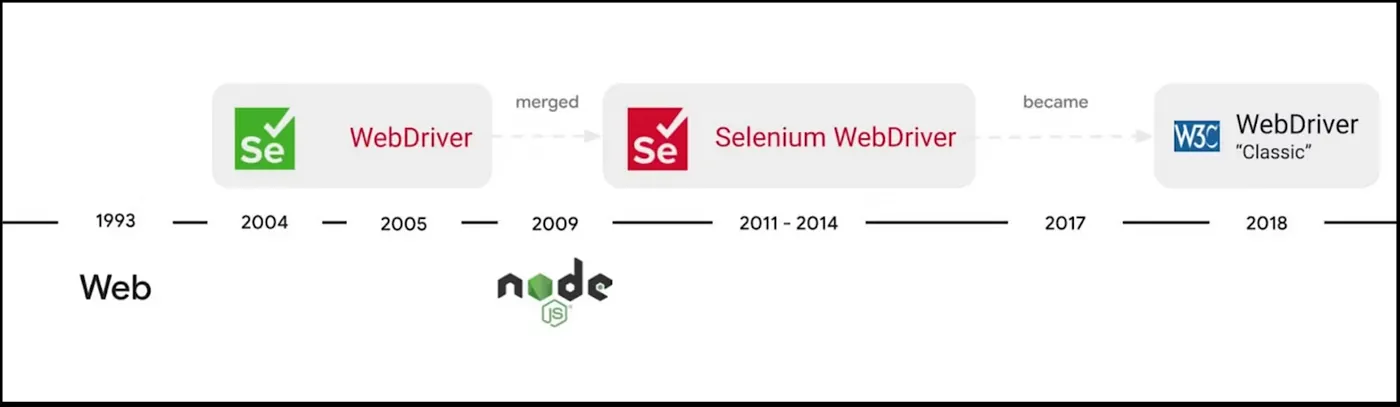
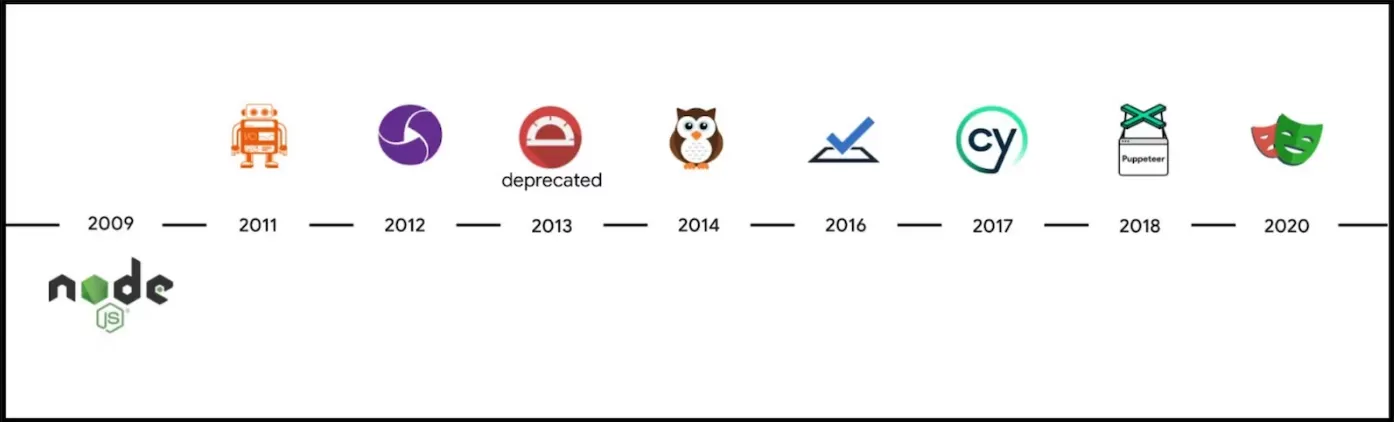
Over time, we have witnessed the evolution of web development with Node.js, supported by a variety of modern front-end frameworks. At the same time, there has been an evolution of test automation frameworks based on Selenium WebDriver, such as Selenium WebDriverIO, Nightwatch, and many others. While many users found the features and capabilities of Cypress and TestCafe attractive, these two testing frameworks are not built on Selenium WebDriver. Instead, they leverage web APIs and Node.js to execute directly in the browser.
Protractor was introduced alongside Angular, but it has been deprecated. The first automation tool built on the Chrome DevTools Protocol (CDP) was Puppeteer, and later we saw the birth of Playwright, built on the same protocol as Puppeteer.
With modern frontend development, an important challenge is the speed of execution and support for low-level testing. Low level, in this case, means executing tests with greater control, opening multiple tabs, and simulating mobile devices. The two main technologies that enable a solution for this are Selenium WebDriver and CDP.
Testing frameworks can be grouped into two categories, and we will focus on the low-level group where WebDriver BiDi can play an important role.
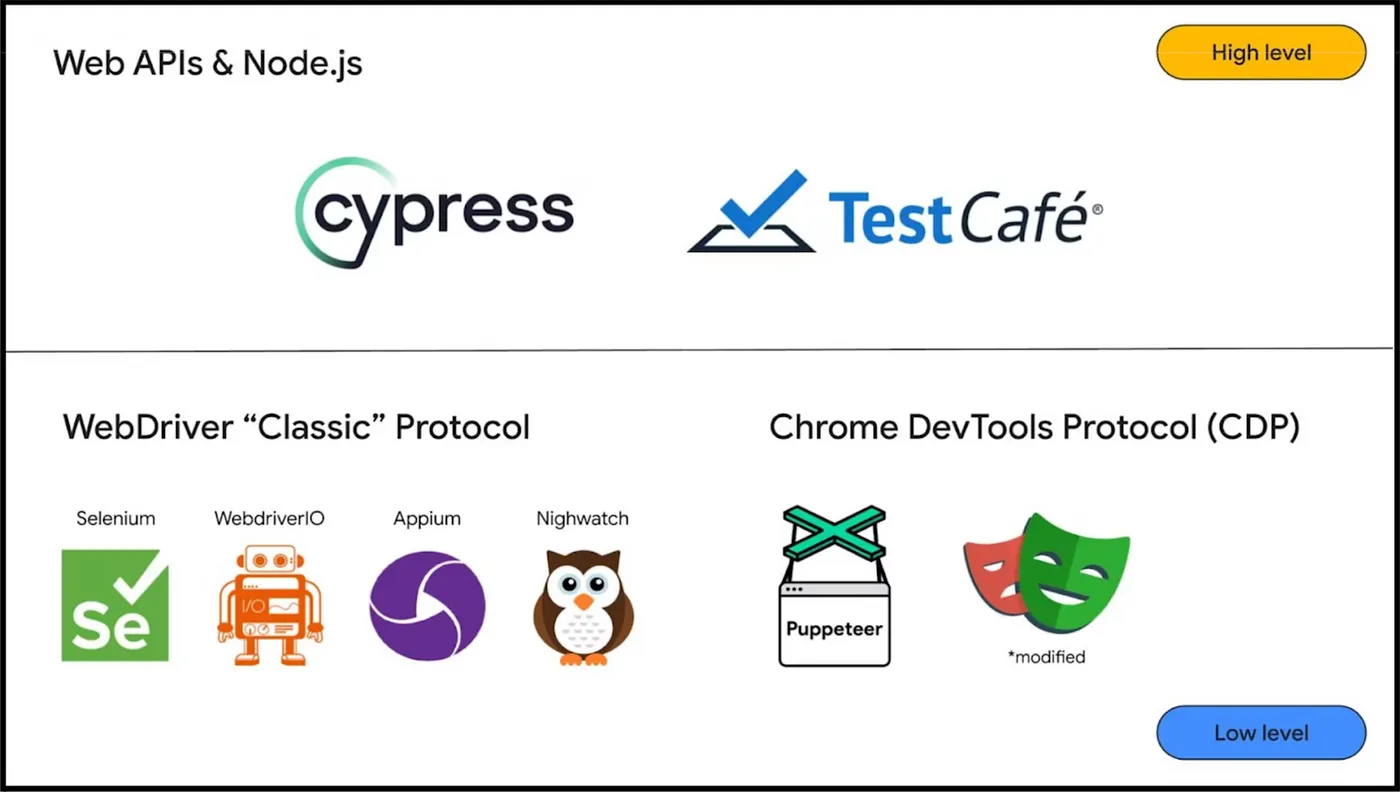
WebDriver “Classic” Protocol vs Chrome DevTools Protocol
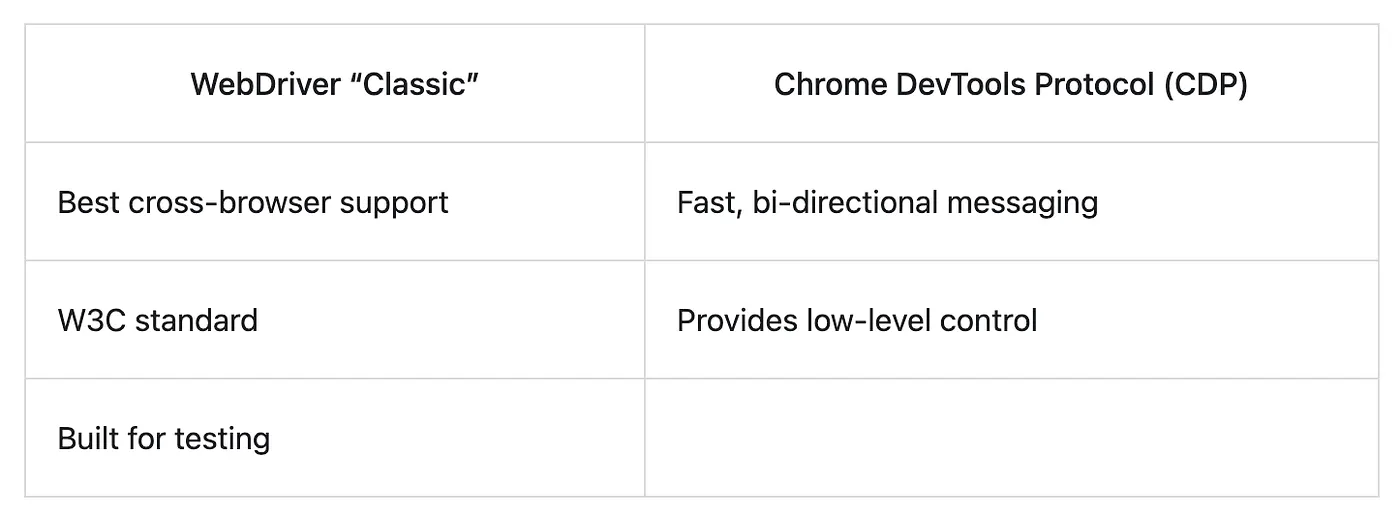
WebDriver is a popular choice for automation in the testing community. It is a W3C standard and great for cross-browser testing. On the other hand, CDP provides fast speed as it runs on the same machine as the browser, allows bi-directional communication, and provides excellent low-level control.
The goal of WebDriver BiDi is to combine the strengths of both protocols.
CDP is developed for browser debugging purposes. It enables functionality available in Browser Developer Tools, and many features of this protocol are also great candidates to be used in automation tools. Some of the low-level controls available include following capabilities:
- Capturing console messages
- Intercepting network requests
- Simulating device mode
- Simulating geolocation
- And more!
Let’s take a closer look at how Selenium WebDriver is implemented. For automation tools that use the Selenium WebDriver protocol, communication with the browser is achieved through the BrowserDriver. This is the implementation of the WebDriver standard for a specific browser. Some widely-used implementations include ChromDriver, GeckoDriver, and SafariDriver. GeckoDriver supports automation of Mozilla Firefox, while SafariDriver automates Apple Safari which is running on WebKit engine. These drivers are implemented by the respective browser vendors.
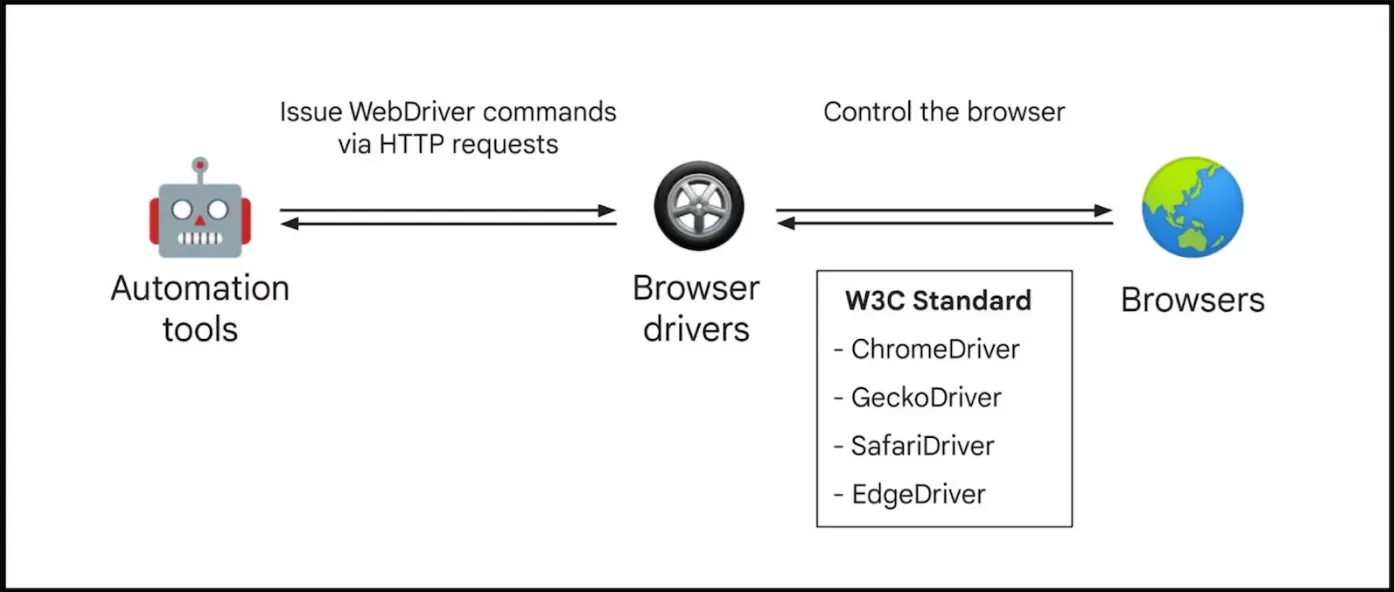
Sending commands to the browser via WebDriver is translated into an API request, which can look like this:
# WebDriver: Click on a coffee element

curl -X POST http://127.0.0.1:4444/session/:element_id/element/click
   -H 'Content-Type: application/json'
   -d '{}'
On the other hand, communication with the browser through CDP is done without the implementation of a browser-specific driver.
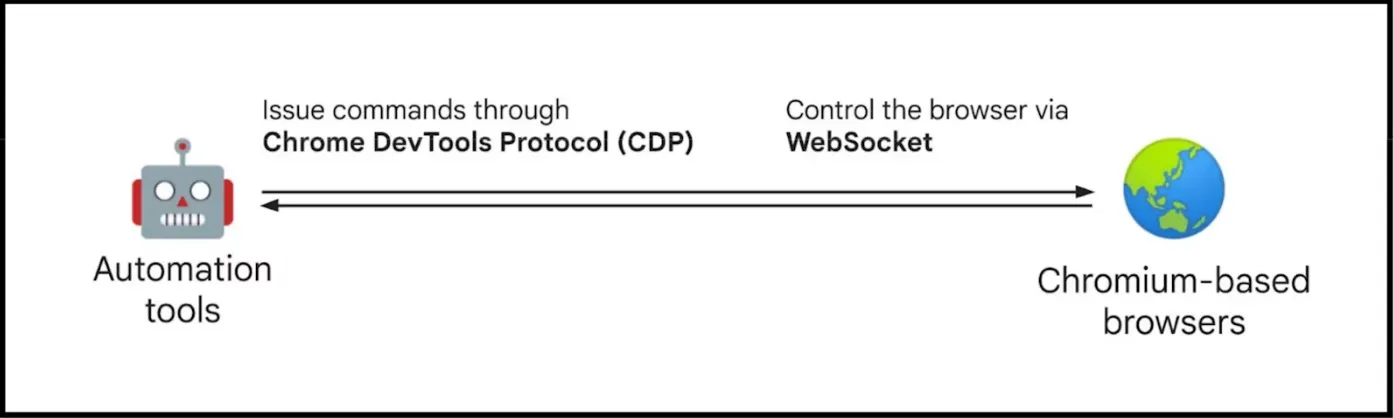
Clicking on an element using CDP can be done using the following example:
// CDP: Click on a coffee element

// Mouse pressed
{
  command: 'Input.dispatchMouseEvent',
  parameters: {
    type: 'mousePressed', x: 10.34, y: 27.1, clickCount: 1 }
}

// Mouse released
{
  command: 'Input.dispatchMouseEvent',
  parameters: {
    type: 'mouseReleased', x: 10.34, y: 27.1, clickCount: 1 }
}
Challenges of WebDriver BiDi
So far, we have learned that the WebDriver “classic” implementation relies on a specific BrowserDriver implementation. WebDriver accepts commands via APIs and sends them to the browser to execute actions. Chromium-based browsers come with the CDP protocol, which eliminates the need for an additional driver to control the browser. However, using only CDP makes it difficult for automation tools like Puppeteer to support other browsers such as Firefox and Safari.
As previously mentioned, all major browser vendors have joined the working group of WebDriver BiDi, which will aid in developing solutions across all browsers. This will enable Puppeteer to support cross-browser automation, which is not currently available, and allow other tools to switch to WebDriver BiDi for better cross-browser support.
Defining a W3C standard and getting all browser vendors on board is a time-consuming process, which is probably one of the biggest challenges for WebDriver BiDi. Pavel Feldman, a Microsoft engineer working on the Playwright automation tool, recently highlighted this challenge during a Q&A session at the Microsoft Build conference. He was asked if Playwright would switch to WebDriver BiDi. Currently, Playwright is developed independently of the W3C standard. This allows for a faster implementation of new features while still listening to a wide community.
WebDriver “classic” based automation tools and CDP-based tools are two different worlds. The former is implemented through APIs that can be called via a remote WebDriver server, while the latter uses a protocol shipped with the browser for direct and fast communication.
WebDriver BiDi is a combination of these two worlds, which presents the second great challenge of aligning old and new WebDriver while maintaining low latency to achieve the same speed as CDP-based automation tools.
In an example of clicking on an element using CDP, we saw that implementation with CDP can be complex and difficult to read. The new WebDriver BiDi protocol aims to provide a machine- and human-readable API specification, which is a challenging task.
If the goal of a simple API specification is achieved, browser vendors will have an easier task of implementing and maintaining it. A simple implementation will also allow current automation tools based on the “classic” WebDriver to enhance their automation with DevTools-specific features.
Let’s a have look at some main goals from WebDriver BiDi.
Support for top customer scenarios:
- Listen for DOM events
- Log what’s going on in the browser including console and JS errors
- Fail fast on any JS error
- Mock backends and intercept network requests
- Record traffic
- Full-page screenshot
- Access to native DevTools protocol
- Dynamic changes to iframe or documents
- Performance timings
- Notifying of new contexts
- Bootstrap scripts
More details about main goals can be found here.
These goals are quite similar to what we can already see in other modern testing frameworks. One potential feature of the WebDriver BiDi protocol is auto-waiting for elements or pages to load, which would be a valuable addition already available in Playwright for example. Combining these new features with the current capabilities of WebDriver could elevate the Selenium ecosystem to a new level. It could also benefit other tools, such as Cypress and Playwright, that are already leveraging modern browser capabilities through standardisation and better support from browser vendors.
Test examples
Currently, not much automation can be implemented. The two examples demonstrate how to open the page and read logs from the developer console. At this time, further tests and interactions such as finding elements, filling in values, and clicking elements are not implemented.
The first test showcases an example with basic authentication and then verifies the window title.
// basic_auth.js

require('chromedriver');
const { Builder } = require('selenium-webdriver');
const { Options } = require('selenium-webdriver/chrome');
var assert = require('assert');

describe('webdriver bidi tests', async function () {
  this.timeout(0)

  it('basic authentication', async function () {
    let driver = await new Builder()
      .forBrowser('chrome')
      .setChromeOptions(new Options().addArguments('--headless'))
      .build();

    const pageCdpConnection = await driver.createCDPConnection('page');
    await driver.register('admin', 'admin', pageCdpConnection);
    await driver.get('https://the-internet.herokuapp.com/basic_auth');

    let title = await driver.getTitle();
    assert.equal('The Internet', title);

    console.log(`log title: ${title}`);

    await driver.quit();
  });
});
During the second test, we listen to log events and exceptions and display them in the console. In a real-world scenario, this approach could be used to validate console outputs and determine if there are any JavaScript errors, which would result in failing tests.
// console_events.js

require('chromedriver');
const { Builder } = require('selenium-webdriver');
const { Options } = require('selenium-webdriver/chrome');
var assert = require('assert');

describe('webdriver bidi tests', async function () {
  this.timeout(0)

  it('log console logs and exceptions', async function () {
    let driver = await new Builder()
      .forBrowser('chrome')
      .setChromeOptions(new Options().addArguments('--headless'))
      .build();

    const pageCdpConnection = await driver.createCDPConnection('page');
    await driver.get('https://www.facebook.com/');

    await driver.onLogEvent(pageCdpConnection, function (event) {
      console.log(event['args'][0]['value']);
    });

    await driver.onLogException(pageCdpConnection, function (event) {
      console.log(event['exceptionDetails']);
    })

    await driver.executeScript('console.log("Here is my console log from browser!")');

    let title = await driver.getTitle();
    assert.equal('Facebook - log in or sign up', title)

    console.log(`log title: ${title}`);

    await driver.quit();
  });
});
Finally here is a small sneak preview of tests execution in GitHub Actions. Complete project you can find in GitHub repository.
Where are we now?
WebDriver BiDi currently provides some documents with goals, progress and proposal:
- Explainer — with more background and goals
- A roadmap based on real-world end-to-end user scenarios
- Detailed proposals for the initial protocol
- A unofficial spec draft waiting to be fleshed out
In the examples we have seen so far, the current implementation allows for navigating to a page and listening to logs in the Browser Console. The next implementation will likely include emulation of keyboard input and clicking elements, enabling us to implement real scenarios and make the first comparison with WebDriver “classic” and other CDP-based tools.
I will be following the progress of the WebDriver BiDi protocol and its implementation, and hopefully have a chance to write about it and provide more examples soon.
In my opinion, WebDriver BiDi is an exciting technology that can improve automation testing in the future. However, it also comes with challenges that we hope will be overcome.
References:
- https://github.com/w3c/webdriver-bidi
- https://developer.chrome.com/articles/webdriver-bidi/#supporting-webdriver-bidi-how-you-can-help
- https://www.w3.org/groups/wg/browser-tools-testing/tools
- https://w3c.github.io/webdriver-bidi/
- https://www.selenium.dev/documentation/webdriver/bidirectional/
- https://github.com/w3c/webdriver-bidi/blob/master/roadmap.md
- https://github.com/w3c/webdriver-bidi/blob/master/proposals
- https://github.com/mustafa-masetic/webdriver-bidi


